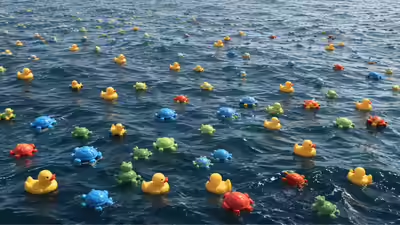
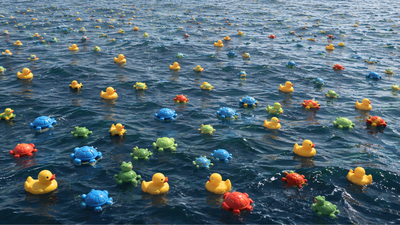
उत्तरी प्रशांत क्षेत्र को पार कर रहे एक मालवाहक जहाज को एक शक्तिशाली तूफान का सामना करना पड़ा जिससे कई शिपिंग कंटेनर समुद्र में बह गए। उन कंटेनरों में से एक में 28,800 प्लास्टिक स्नान खिलौने थे जिनमें पीली बत्तखें, नीले कछुए, लाल ऊदबिलाव और हरे मेंढक शामिल थे। जो एक नियमित शिपिंग दुर्घटना प्रतीत होती थी वह जल्द ही इतिहास में सबसे असामान्य वैज्ञानिक प्रयोगों में से एक में बदल गई। जैसे-जैसे खिलौने वर्षों तक महासागरों में बहते रहे, शोधकर्ताओं ने उनकी गतिविधियों पर नज़र रखी और इस जानकारी का उपयोग इस बात की गहरी समझ हासिल करने के लिए किया कि ग्रह के चारों ओर समुद्री धाराएँ कैसे चलती हैं। आकस्मिक रिसाव ने वैज्ञानिकों को बहुमूल्य डेटा प्रदान किया जिसे पारंपरिक तरीकों से एकत्र करना बेहद कठिन और महंगा होता।
उस दिन 28,800 स्नान खिलौने समुद्र में गायब हो गए
10 जनवरी 1992 को, मालवाहक जहाज एवर लॉरेल हांगकांग से टैकोमा, वाशिंगटन की ओर जा रहा था, जब उसे अंतर्राष्ट्रीय तिथि रेखा के पास उत्तरी प्रशांत क्षेत्र में गंभीर मौसम का सामना करना पड़ा। तूफान के दौरान शक्तिशाली लहरों ने बारह शिपिंग कंटेनरों को गिरा दिया।उन कंटेनरों में से एक में बच्चों के लिए निर्मित 28,800 प्लास्टिक स्नान खिलौने रखे हुए थे। शिपमेंट में 7,200 पीली बत्तखें, 7,200 नीले कछुए, 7,200 लाल ऊदबिलाव और 7,200 हरे मेंढक शामिल थे। आख़िरकार, कंटेनर टूट गया और उसकी सामग्री प्रशांत महासागर में निकल गई।कई स्नान खिलौनों के विपरीत, इन खिलौनों में कोई छेद नहीं था। उन्हें पूरी तरह से सील कर दिया गया था, जिसका मतलब था कि वे पानी भरे बिना वर्षों तक तैर सकते थे। यह विशेषता बाद में उन्हें समुद्री धाराओं की गति का अध्ययन करने के लिए आदर्श बनाएगी।अधिकांश शिपिंग दुर्घटनाएँ कुछ ही दिनों में लोगों की स्मृति से गायब हो जाती हैं, लेकिन इसने समुद्र विज्ञानियों का ध्यान आकर्षित किया। वैज्ञानिकों ने महसूस किया कि हजारों समान तैरती वस्तुएं एक ही स्थान और समय पर समुद्र में प्रवेश कर गई थीं, जिससे सतह की धाराओं की गति का अध्ययन करने का एक दुर्लभ अवसर पैदा हुआ।रिसाव से प्रभावित लोगों में समुद्र विज्ञानी कर्टिस एब्समेयर भी शामिल थे, जिन्होंने समुद्र तट पर रहने वालों और तटीय समुदायों से बरामद खिलौनों की रिपोर्ट एकत्र करना शुरू किया। किनारे पर बहकर आया हर खिलौना उस रास्ते के बारे में संकेत देता था जो उसने समुद्र के माध्यम से लिया था।मौजूदा मौजूदा मॉडलों के साथ इन खोजों की तुलना करके, शोधकर्ता अपनी समझ का परीक्षण और परिशोधन कर सकते हैं कि पानी विशाल दूरी तक कैसे चलता है।
प्रशांत महासागर के अदृश्य राजमार्गों का अनुसरण करते हुए
प्रशांत महासागर में प्रवेश करने के बाद, खिलौने तेज़ी से तितर-बितर हो गए। कुछ उत्तर की ओर चले गए और एक वर्ष के भीतर अलास्का के तट पर दिखाई देने लगे। अन्य लोग उत्तरी प्रशांत गायर में फंस गए, जो धाराओं की एक विशाल गोलाकार प्रणाली है जो लगातार पानी और तैरते मलबे को समुद्र के बेसिन के चारों ओर ले जाती है।समय के साथ, हवाई, जापान और उत्तरी अमेरिका के पश्चिमी तट से देखे जाने की सूचना मिली। खिलौनों ने उन मार्गों का अनुसरण किया जो समुद्र विज्ञानियों द्वारा की गई भविष्यवाणियों से काफी मेल खाते थे, जिससे पुष्टि होती थी कि उनके मॉडल काफी हद तक सटीक थे।रिसाव ने एक वास्तविक दुनिया का प्रदर्शन प्रदान किया कि कैसे समुद्री धाराएँ अदृश्य राजमार्गों के रूप में कार्य करती हैं, जो हजारों किलोमीटर तक तैरती वस्तुओं को ले जाती हैं।
आर्कटिक के माध्यम से एक आश्चर्यजनक यात्रा
स्नान खिलौनों की यात्रा के सबसे उल्लेखनीय पहलुओं में से एक में आर्कटिक महासागर शामिल था। वैज्ञानिकों ने भविष्यवाणी की थी कि कुछ खिलौने बेरिंग जलडमरूमध्य के माध्यम से उत्तर की ओर जाएंगे और आर्कटिक समुद्री बर्फ में फंस जाएंगे।जैसे-जैसे आर्कटिक में बर्फ बहती गई, खिलौने उसके साथ चलते गए। वर्षों बाद, जब बर्फ पिघली, तो बहुतों को वापस खुले पानी में छोड़ दिया गया और उत्तरी अटलांटिक में ले जाया गया।इस अप्रत्याशित मार्ग से शोधकर्ताओं को प्रशांत और अटलांटिक महासागरों के बीच संबंध को बेहतर ढंग से समझने में मदद मिली। इससे यह भी पता चला कि कैसे समुद्री बर्फ तैरते हुए मलबे को भारी दूरी तक ले जा सकती है।
सुदूर तटों तक पहुँचना
प्रशांत महासागर छोड़ने के बाद स्नान खिलौनों ने वर्षों तक अपनी यात्रा जारी रखी। कुछ अंततः उत्तरी अमेरिका के पूर्वी तट पर दिखाई दिए, जबकि अन्य यूरोपीय समुद्र तटों पर पाए गए।वैज्ञानिकों का अनुमान है कि कुछ खिलौनों ने अपनी दशकों लंबी यात्रा के दौरान 27,000 किलोमीटर या लगभग 17,000 मील से अधिक की यात्रा की होगी। कुछ लोगों ने कल्पना की होगी कि साधारण प्लास्टिक स्नान खिलौने पूरे महासागरों को पार कर जाएंगे और जहां से वे समुद्र में प्रवेश करेंगे, वहां से हजारों मील दूर समुद्र तट तक पहुंच जाएंगे।इन खोजों ने इस बात पर प्रकाश डाला कि दुनिया के महासागर वास्तव में कितने आपस में जुड़े हुए हैं।
वैज्ञानिकों ने क्या सीखा
फ्रेंडली फ्लोटीज़ स्पिल समुद्र विज्ञान में एक महत्वपूर्ण केस स्टडी बन गया। खिलौनों पर नज़र रखने से, शोधकर्ताओं को समुद्री धाराओं के व्यवहार, तैरते मलबे की गति और बड़े समुद्री लहरों की भूमिका के बारे में बहुमूल्य जानकारी प्राप्त हुई।निष्कर्षों ने दुनिया भर में पानी की गति की भविष्यवाणी करने के लिए उपयोग किए जाने वाले कंप्यूटर मॉडल को बेहतर बनाने में मदद की। वैज्ञानिकों ने इस बारे में भी अधिक जानकारी प्राप्त की कि कैसे मलबा आर्कटिक से होकर गुजरता है और अंततः अन्य महासागरीय घाटियों में प्रवेश करता है।फैलाव ने प्रदर्शित किया कि समुद्री धाराएँ पृथक प्रणालियाँ नहीं हैं। इसके बजाय, वे एक विशाल नेटवर्क बनाते हैं जो ग्रह के सुदूर क्षेत्रों को जोड़ता है।
प्लास्टिक प्रदूषण के बारे में एक सबक
हालाँकि नहाने के खिलौने वैज्ञानिक अनुसंधान के लिए उपयोगी साबित हुए, लेकिन इस घटना ने बढ़ती पर्यावरणीय चिंता को भी उजागर किया। खिलौने दशकों तक जीवित रहे क्योंकि वे टिकाऊ प्लास्टिक सामग्री से बने थे जो गिरावट का विरोध करते थे।उनकी लंबी यात्रा ने दिखाया कि कैसे प्लास्टिक कचरा समुद्री वातावरण में बना रह सकता है और असाधारण दूरी तय कर सकता है। जो चीज़ एक स्थान पर समुद्र में प्रवेश कर गई वह अंततः हजारों किलोमीटर दूर समुद्र तटों पर दिखाई दी।इस अहसास ने प्लास्टिक प्रदूषण की वैश्विक प्रकृति और समुद्री मलबे की सफाई में शामिल चुनौतियों के बारे में जागरूकता बढ़ाने में मदद की।
फ्रेंडली फ्लोटीज़ की विरासत
दुर्घटना के तीन दशक से भी अधिक समय बाद, फ्रेंडली फ्लोटीज़ की कहानी आकस्मिक वैज्ञानिक खोज के सबसे आकर्षक उदाहरणों में से एक बनी हुई है। जो नौवहन दुर्घटना के रूप में शुरू हुआ वह एक अद्वितीय बड़े पैमाने का प्रयोग बन गया जिसने शोधकर्ताओं को महासागरों को बेहतर ढंग से समझने में मदद की।तैरती बत्तखों, कछुओं, मेंढकों और ऊदबिलावों ने लहरों के नीचे छिपे हुए रास्तों का खुलासा किया और दिखाया कि दुनिया के महासागर वास्तव में कितने जुड़े हुए हैं। उनकी अप्रत्याशित यात्रा ने एक साधारण कार्गो दुर्घटना को एक वैज्ञानिक कहानी में बदल दिया जो शोधकर्ताओं और जनता को समान रूप से आकर्षित करती है।कभी-कभी, महानतम खोजों की योजना नहीं बनाई जाती है। वे बस इतिहास में चले जाते हैं।